
ISV (No Notes)1.2 - Google Play
You'll be able to see results in few seconds.
Publisher Description
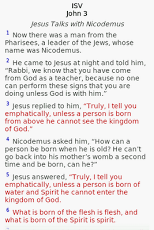
(This is not a stand-alone App & can also be downloaded directly through the free "CadreBible - Bible Study App" with many other resources.)International Standard Version (ISV) is a new translation of the Bible in contemporary English from the original Greek and Hebrew texts including the Dead Sea Scrolls and other ancient manuscripts.* Includes Section Headings* Words of Christ in Red ,or preferred colour* View ISV in Parallel with other Bibles and Commentaries in the CadreBible Library.* Create Your Own ISV Reading Plan.* No Internet Connection required to read (off-line).(ISV including thousands of detailed Footnotes, colour Maps and linked Thematic Table of Contents also available for CadreBible.) CADREBIBLE FEATURES INCLUDE:Enjoy Reading or Studying the Scriptures with this feature packed, OFF-LINE Bible App!* Large Library of electronic Bibles, Dictionaries, Commentaries, Cross-References, Reading Plans, Devotionals, Children's Bible Stories and other resources available within ONE app.(Includes FREE books: KJV, NET, ASV, BBE, CUV(和åˆ本), SBL GNT, WEB, YLT, Tanakh, Bible for Children, Strong's Dictionaries, Matthew Henry's Concise Commentary, People's New Testament, ISBE, Torrey's, Webster’s 1913, Spurgeon, Josephus and more...). (Additional content available for purchase directly through CadreBible App or cadrebible.com:NIV, AMP, KJV Strong's, NLT, ESV, NASB Strong's, ISV (Notes/Maps), MSG, NET, NA27, Wuest Word Studies, IVP BBBC and more.)* 2 or 3 touch Verse Picker with options for Quick Pick, Full Names, Alphabetic listing & Colour/White text.* OFF-LINE Reading Plans or “Create My Own Planâ€Â. Select any installed Bible to read in your Plan and track progress with our off-line colour coded calendar. Full access to all features (eg. Bookmarks, Notes, Highlights, Links, Parallel…) in Reading Plan.* Parallel View. Compare multiple Bibles and/or Commentaries on one screen for further study.* Search. Sophisticated Search feature including fully functional Chinese search.* Greek and Hebrew texts (SBL Greek New Testament, Scrivener, Westcott-Hort, Septuagint, Tanach & more) with built-in fonts.* Bookmarks, Notes, Save: Single or Multi-verses. Sort into colour coded Categories, fully editable. Notes Search.* On-line Notes: Create, View, Edit or Delete CadreBible Notes at cadrebible.com.* Create Sessions during a Sermon/Bible Study. Add more Notes and Verses to the Session at any time in the future.* Highlight words, phrases or verses using our full colour spectrum.* Underline words, phrases or verses.* Share verses via Facebook, Twitter, SMS, E-mail, Printer and other.* Syncronisation1. Evernote Sync: Access and Edit your Notes anywhere anytime from your PC.2. Free CadreBible Sync Service: Access your Bookmarks, Notes, Sessions, Highlights & Underlines on multiple devices.* Copy multiple verses to clipboard for later use.* Text-To-Speech. Reads Bible text to you as an audio alternative. Set preferred TTS Speed, Pitch and Volume. Install your own TTS app from the Market for different voices and accents. Android 1.6 and above.* Auto-Scroll. Automatically scrolls Bible text and turns to the next page. Set preferred Auto-Scroll Speed.* History. Store browsing History for future navigation and set storage limit. Browse using Back Arrow, if preferred.* Backup and Restore (Bookmarks, Notes, Sessions, Highlights, Underlines & Reading Plans) to SD Card or On-line at cadrebible.com. CadreBible automatically Backs-up to SD Card. This feature can be turned off in Settings.* Numerous custom Settings including: Font Size, Colour of: Font, Background, Links, Verse Numbers, Words of Christ (in books that support Words of Christ in Red). Save your own Colour Themes. Auto-rotate Screen, Keep Screen on, Show/Hide Icons, Superscript Verse No’s and others settings available.* Full Screen. Double tap to show/hide Drawer Tabs.* Help. Off-line help available within the application.
About ISV (No Notes)
The company that develops ISV (No Notes) is CadreWorks Pty Ltd. The latest version released by its developer is 1.2.
To install ISV (No Notes) on your Android device, just click the green Continue To App button above to start the installation process. The app is listed on our website since 2013-06-29 and was downloaded 0 times. We have already checked if the download link is safe, however for your own protection we recommend that you scan the downloaded app with your antivirus. Your antivirus may detect the ISV (No Notes) as malware as malware if the download link to com.cadreworks.cadrebible.premiumbooks.isv_limited is broken.
How to install ISV (No Notes) on your Android device:
- Click on the Continue To App button on our website. This will redirect you to Google Play.
- Once the ISV (No Notes) is shown in the Google Play listing of your Android device, you can start its download and installation. Tap on the Install button located below the search bar and to the right of the app icon.
- A pop-up window with the permissions required by ISV (No Notes) will be shown. Click on Accept to continue the process.
- ISV (No Notes) will be downloaded onto your device, displaying a progress. Once the download completes, the installation will start and you'll get a notification after the installation is finished.
Program Details
System requirements
Download information
Pricing
Version History
version 1.2
posted on 2013-06-29
Several fixes and updates
version 1.2
posted on 2013-06-29
Disclaimer
Official Google Play Link
We do not host ISV (No Notes) on our servers. We did not scan it for viruses, adware, spyware or other type of malware. This app is hosted by Google and passed their terms and conditions to be listed there. We recommend caution when installing it.
The Google Play link for ISV (No Notes) is provided to you by apps112.com without any warranties, representations or guarantees of any kind, so access it at your own risk.
If you have questions regarding this particular app contact the publisher directly. For questions about the functionalities of apps112.com contact us.
